• About
  • Services
  • Portfolio
  • Contact

Content Trends

Content Marketing, SEO and Digital Marketing

  • Home
  • Why Content Marketing?
  • SEO
  • Blogging Tips
  • Social Media
  • Newsletter

7 Essential SEO Tools for All Content Writers

July 15, 2012 by Gazalla Gaya

Seo Tools Save Time and Effort

It’s no secret that the best way to increase organic traffic is through writing targeted copy using proper search engine optimization techniques. The good news is that we have several seo tools in the market today, that make content writing easy. These seo tools help us:

  • find the right keywords
  • write targeted copy
  • increase conversions by split testing our copy to see which version is most effective
  • write the right metadata and description
  • track down any content that has been plagiarized from our site

The seo tools that I’m sharing with you are indispensable to me as a content creator and will help you in any web writing: whether you are writing copy for a large corporate site; or creating content for a blog post.

#1. Google’s Keyword Tool

Google’s keyword tool is the best keyword research tool on the market and it’s free! The Google keyword tool is indispensable for helping writers in their content writing strategies. You can research the number of global and local searches for a particular keyword. Google Keyword tool also allows you to see how competitive the keyword is. Generally speaking, the rule is to go for reasonably popular keywords with lower competition.

The Google keyword tool is #1 on my list because proper seo strategies always begin with good keyword research.

#2. Google Insights

Google Insights for Search provides insights into the search terms people have been entering into the Google search engine. Google Insights is similar to Google Trends, but unlike Google Trends, Google Insights also provides a visual representation of regional interest on a country’s map. It displays top searches and rising searches that may help with keyword research. Results can be narrowed down with categories that are displayed for each search term.
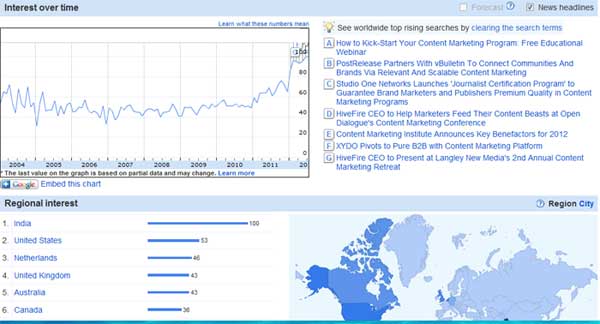
Google Insights

Google Insights showing an increase in search for “content marketing” and top regional searches

#3. Inbound Writer

I have to say this is one tool that I absolutely love and should be part of any seo writer’s tool kit. Once you put in your copy, Inbound Writer will tell you how many points you score from 1 to 100 with a nifty speedometer! (I love the graphical depiction of how low my score can be at times!). Based on your topic, Inbound Writer will research the internet, researching thousands of related articles, posts and info and come up with the best terms for your document. If there’s one tool, I would recommend, it’s this one. The first 8 articles per month are free after which you need to pay.
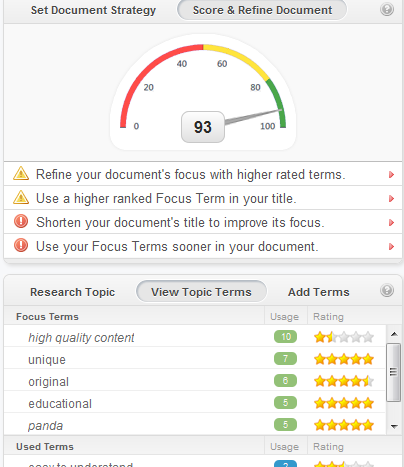
Inbound Writer
Inbound Writer’s speedometer showing you all you need to do to write targeted copy

#4. Google Optimizer

Google Optimizer is a great site testing and optimization tool. It allows you to increase the value of your existing websites and traffic, as you can test your site content and design. You can show several versions of a page to different visitors. Google Analytics measures the efficacy of each page version, and with a new advanced statistical engine, it determines the most effective version. If the user performs the action you want them to perform you know that you have hit upon your winning version of the page. Google Optimizer is especially great for landing pages and checking the conversion rates of one page over another. It’s very effective in determining which copy works better.

Video instructions on how to use Google Optimizer for split testing your copy

As of August 2012, Google Optimizer will be integrated with Google Analytics as Content Experiments, which brings website testing to Google Analytics. Google says that integrating Google Optimizer into Google Analytics will greatly enhance and improve your analytics capabilities. Content Experiments helps you optimize for goals you have already defined in your Google Analytics account, and can help you decide which page designs, layouts and content are most effective.

#5. Market Samurai

Market Samurai saves you a huge amount of time with market research. The workflow behind Market Samurai is that you use the filters to cull your keyword list down to a small number of keywords, and analyze those to find the keyword(s) that have the weakest competition… And then work with those keywords.
Market Samurai helps you:

  • find marketable keywords that have a low competition
  • find content in related articles
  • learn if what you plan to write has already been extensively covered elsewhere
  • link to relevant articles
  • schedule and publish content straight to your blog

Market Samurai is a paid tool but unlike other seo tools that are unaffordable, Market Samurai has a one-time payment of $149. The features that I frequently use are Rank Tracker, checking your seo competition, the content and back-link finder.

#6. All in One Seo Pack for WordPress

There are many seo related plugins for WordPress, the latest being WordPress SEO by Yoast which I’ve yet to try although currently it has a great reputation. I use All in One Seo Pack. You can write your metadata, title, keywords and description. It’s the ONLY plugin to provide SEO Integration for WP e-Commerce sites.

#7. Copyscape

Copyscape is a plagiarism checker. It checks to see if anyone has been stealing your content and is a good idea in these times when duplicate content is a big no-no and is being penalized by Google.

Which tools do you find indispensable in your content writing process? Please share in the comments below.

You May Also Like:

Google Gets Picky over Content with Panda
How to Write Quality Content that is Search Engine Friendly
10 Free Seo Tools

Filed Under: Seo Tagged With: Copyscape, Google Website Optimizer, Inbound Writer, Market Samurai, seo, Seo Content Writing, seo copywriting, seo copywriting tools, seo tools

High Quality Content: A Simple 4-Point Checklist for Creating the Best Content

July 5, 2012 by Gazalla Gaya

Last year, Google’s Panda filter shook up the internet. The biggest losers were sites with duplicate content, plagiarized content, sites with obvious keyword stuffing and grammatical errors.
The verdict was out: Google was cleaning up the internet and making it a great place to be once again. Panda brought about a much needed new awakening, a new search for high quality content among site owners. In the wake of Panda, several pundits weighed in on the definition of high quality content. I took this opportunity to ask a few experts what their views were on high quality content.

I gleaned key pieces of insights from that discussion, my own experience and also through talking to several web content managers, directors and editors, over the years. These top 4 characteristics have been on everyone’s list as essential for creating the best content for your audience:

# 1. Unique and Original Content

All 4 experts in my interview unanimously agreed that quality content needs to be unique and original. Web writer and editor, Alan Eggleston summed it up eloquently when he said “The facts may be the same, but it is written with the style, voice, and tone that is unique and original to you as the author and with the interest of the audience in mind for the vehicle in which it will appear.”
In a post Panda world, unique and original content is rewarded by coming up at the top of search results. Plagiarized and duplicate content have always been a no-no but Panda took care of enforcing this rule with heavy penalties for the non-conformists.
The topic doesn’t have to be unique but your perspective does. For example if you have a recipe site, there are tons of recipes for chocolate cake, but what would make your chocolate cake recipe unique would be your own original recipe.

#2. Extremely Articulate and Well Written

High quality content is so well written that your audience will keep coming back for more. It flows well, sounds good and feels almost like a melody.
Here are some key indicators of well written content:
•Besides being free of grammatical errors, well written content is also succinct and to the point. Every word that doesn’t belong is eliminated.
• High quality content is never vague. It paints a concrete picture and captures our imagination because we can picture it in our minds.
• High quality content is never pretentious or pompous. Instead, it has a natural flow. If a sentence feels uncomfortable, it needs to be cut from your copy.

#3. Easy to Understand

The internet revolution has changed the way we communicate – less is always better, easier is always better.
Gone are the days of bombastic language, hyperboles and exaggerated speech. They still work in poetry and prose but as a form of communication, they are passé. The high quality sites are usually where the most complex subject matters are explained (to their target audience) in a surprisingly easy way so that any lay person could understand. The Mayo Clinic is a perfect example. Even the most complex disease or condition is explained in simple terms. The Mayo Clinic has an Alexa ranking of 1,400 which is an indication that it’s an extremely high traffic site, because people who research their conditions can actually understand what is happening to them!

#4. Educational

High quality content always makes us think in a new way or rewards us for spending our time because we learn something new. It’s educational without being preachy. As content creators, if we strive to create at least one key takeaway we would greatly enhance the quality of our content.
The following sites are perfect examples of educational content. They are at the top of their game, receive high rankings and plenty of traffic and subscribers, in large part, due to the quality of their content. These sites have interesting informative, educational stuff for content writers, bloggers and people with a passion for great content.

  • Copyblogger is an excellent site for content marketing tips.
  • Seomoz is a great site for seo advice.
  • Social Media Examiner has the best tips for social media optimization.

To sum it up, high quality content is always unique and original, well written, educational and easy to understand.

Do you agree with these 4 characteristics? Do you have more to add? Please share in the comments below.

You May Also Like:

High Quality Content: 4 Experts Share their Views
Google Gets Picky over Content with Panda
How to Write Quality Content that is Search Engine Friendly

Filed Under: Web Content : Ideas, Tips and Resources Tagged With: high quality content, panda, unique and original content, web content

How to Earn an Income from Your Blog : Interview with David Risley

June 24, 2012 by Gazalla Gaya

[frame type=”left” width=”200″ height=”200″
src=”https://contenttrends.com/wp-content/uploads/2012/06/headshot_200_200.jpg”]Last week, I had the opportunity to interview David Risley. He gave a presentation at Blog World titled, “Blog Monetization Options: What are ALL the ways to make money with a blog?”. I enjoyed his presentation and was engaged from the the get go especially when he started his presentation by stating that blogs don’t make money, but businesses do.

David makes his living full-time as a highly successful internet entrepreneur. He describes himself as a father, husband, entrepreneur, blogger, author, speaker and consultant. After he graduated, David did not want to be stuck in a traditional 9-5 job. He started a site called PCmechanic.com back in 1998. The site was very successful and he was soon generating a six-figure income. He started helping others create online businesses with the help of his courses and ebooks.

Many internet marketers sell the internet lifestyle as laid-back and easy. They paint visions of sitting on the beach, sipping a cool drink and chilling. What impressed me about David is that he goes against creating that stereotypical image to tell you that creating a full-time income as a blogger is not easy and takes a lot of work. “Just as you cannot run right out and start an offline business overnight and make money right away… you probably shouldn’t be thinking you can do it online.”

Here are the excerpts from the interview:

“My advice, first and foremost, is to know what VFP (Valuable Final Product) you’re shooting for. In other words, what are you trying to help people accomplish?”

[dropcap1]
Q.
[/dropcap1]
I heard the concept of creating a Valuable Final Product (VFP) at your conference session and loved it. Let’s say, your VFP is a service/your expertise. What is the best way to market your services online if you are not a famous name but have the experience? How do you attract attention and build authority?

[dropcap1]
A.
[/dropcap1]You most definitely do NOT need a famous name in order to offer or market a service online. It starts with clearly identifying the outcome that your clients want, and all that that entails. That will nail down your VFP for you.
As far as marketing yourself online, then you go down the ways that many have already talked about:

  • Blogging about your topic
  • Going to communities that talk about your topic and get involved
  • Putting free offers out there to help prospects (in exchange for an email address, of course), etc.
  • Also, I should add… don’t limit yourself to online only. Attend conferences and meetup groups. Many times, offline promo that brings people to your website can work out very well.

[dropcap1]
Q.
[/dropcap1] You’ve said, “I believe many “professional bloggers” out there who teach blogging are leading people astray by focusing too much on the mechanics of blogging – and not enough on building real businesses.” If you had to start over again, what are the mistakes that you have learned from and would do different in building your online business?
[dropcap1]
A.
[/dropcap1]

  • I would definitely have started my email list earlier. It is SUPER important.
  • I would align around an outcome, or VFP. Blog Marketing Academy had one from the get-go. My tech site did not, and the markets where the people are trying to accomplish something are always much better from a business standpoint.
  • Lastly, once you have a VFP in mind, start thinking about product/service offers in the beginning. Because, any business has to have an offer. Otherwise, no customers. And no money. If you want to make money, you have to provide something valuable to an audience in need of that offer. Simply writing and blogging isn’t going to do it.

[dropcap1]
Q.
[/dropcap1]Of all the options you discussed, affiliate marketing is an option that many bloggers consider. I’ve seen famous bloggers like Patt Flynn, Brankica Underwood and Anna Hoffman make a success out of it. Especially if you have a niche site and are selling to that niche.
What is your advice, warning, top things to avoid to people who are new and just getting started with affiliate marketing?
[dropcap1]
A.
[/dropcap1]

  • My advice, first and foremost, is to know what VFP you’re shooting for. In other words, what are you trying to help people accomplish? And make very sure that the things you promote will help people get there. Don’t promote unrelated things just because it has a commission attached to it.
  • I’ve seen many bloggers promote internet marketing stuff on blogs which have nothing to do with marketing. What happens is that they’re interested in the topic and see IMers making money with these things… and they want to partake in it. So, next thing you know, you have promotions for something like Aweber on a blog about knitting (or something equally disrelated). Just don’t do that. Complete misalignment.
  • Also, don’t litter up a blog with affiliate banner ads. Conversion rates are horrible. You’re much better off promoting affiliate programs through the use of truly helpful blog posts where the product is a natural extension of the topic.
  • Also, make sure you’re building an email list, because list promotions always work FAR better than blog promotions.

[dropcap1]
Q.
[/dropcap1]
You are a father, husband, entrepreneur, blogger, guest poster, author. (I’ve bet I’ve missed a few:))
What are your favorite time management techniques? How do you also find the time for social media, commenting, engaging and building relationships?

[dropcap1]
A.
[/dropcap1]Honestly, probably the biggest tip I could provide here is the good ol’ 80/20 rule. 80% of your results come from 20% of your efforts. When you realize this, you begin to look at the things you do with your time with a critical eye.

You mention social media, commenting, engaging, etc. Truth be told, these things almost always fall in the “waste of time” category. Now, don’t get me wrong… they ARE useful. But, they usually fall in the 80% of effort that brings 20% of results category. Lots of time spent doing that stuff, yet it isn’t NEARLY as good a use of my time as working on building my list, finishing an ebook, making a video, helping my existing customers, etc.

So, the keyword here is leverage. Try to spend your time on the things which ACTUALLY bring you results, not just the fashionable stuff everybody says you have to do (like Twitter, for example).

I have a course called Time Master Formula where I go a lot more in-depth into this whole topic of time management.
[dropcap1]
Q.
[/dropcap1]
Who did you start Blog Marketing Academy for?
Also, Do you have any books or courses that would guide the beginner blogger along this field?

[dropcap1]
A.
[/dropcap1]People with blogs who are looking to make effective marketing vehicles out of it. Bloggers who want to build a real online business.

You bet. 🙂

If one is first starting out and just trying to get their bearings on the whole “how the hell do you make money on the Internet” thing, then I have a 3-day course called 3DayMoney.com.

There is also a free 30-day video course I have called the 30 Day Blog Transformation Challenge.

For my other stuff, check out my Products page. 🙂

What about you? Have you found a way to create an income with your blog? Please share with us in the comments below. Please also, share this article on all your social networks. Thanks:)

Articles You May Also Like:
Blog World, New York, 2012: the Good, the Bad and the Ugly
Blog Post Checklist: 8 Essential Tasks before You Publish
7 Blog Marketing Ideas that Increase Traffic and Conversions

Filed Under: Blogging Tagged With: affiliate marketing, blog monetization, business blogging, david risley, earn income from your blog, make money blogging

The Future of Mobile Marketing: Interview with Simon Salt

June 17, 2012 by Gazalla Gaya

Last week, I had the opportunity to interview Simon Salt, author of “The Shorty Guide to Mobile Marketing” and “Social Location Marketing”.
[frame type=”left” width=”237″ height=”160″
src=”https://contenttrends.com/wp-content/uploads/2012/06/simonsalt.jpg”]Simon was a speaker at Blog World, New York, last week and gave a presentation titled “Smartphones, Smarter Users – The Who, What, Where and When of the Mobile Customer”. He has been recognized for his ability to provide strategic marketing guidance that covers Digital, Mobile and Social Marketing. He is an in demand Keynote speaker on the topics of Digital, Mobile and Social Marketing. He teaches an online course in Advanced Mobile Marketing through the LERN network that is distributed to over 300 universities throughout the US and Canada.

He writes online at IncSlingers.

Here are the excerpts:
What does the future of mobile marketing look like, including areas of growth?

  • Mobile is playing an increasing important role in the lives of consumers. Just as a decade ago businesses had to understand the concept of moving their business online now they must grasp that it is an essential element of doing business to be present in the world of mobile.
  • We will see more organizations finding the best fit for their individual audiences. That might be SMS campaigns, mobile optimized websites, apps or partnering with existing apps. There is no one size fits all solution when it comes to mobile.
  • In addition President Obama has recently ordered that government departments embrace the mobile user.
  • Which are examples of best websites that are mobile optimized, that we can look at for inspiration and what makes them so good?
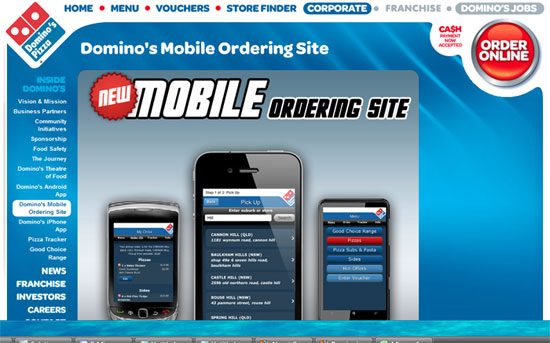
    Domino’s pizza has done a phenomenal job of translating their traditional website into a mobile experience. They have recognized the touchscreen environment of many mobile devices and made use of that as part of the experience.

    Another great example would be Harley Davidson, their site functions exactly as their traditional site does, including being able to navigate around the site and even use the customization features.

    What are some tips and advice on making your content mobile ready?

    • Firstly, optimize what you have. Review the content on your site and ask yourself is this really important, or have we just included it? Will it transfer to a mobile environment and if not do we need to keep it on our traditional site?
    • Also, the way that documents in particular, as well as web pages, are rendered is completely different to the traditional environment. So if you are preparing something like an e-book or a longer document for mobile you have to be much more conscious of page breaks, font size and paragraph breaks.
    • Writers have to be aware of all these differences as well as educating themselves about new technologies like Responsive Design which heavily impact how mobile sites act.

    What according to you are the biggest challenges in creating content for mobiles and best solutions?
    Organizations often have content on their traditional sites in formats that don’t work well with mobile devices, for example product catalogs in .pdf format. These not only use large amounts of a mobile users data plan, they don’t render well on small screens.
    Thinking through how the content will be displayed and ensuring adequate testing is essential to provide a good mobile experience.

    What are some of the biggest mistakes you see businesses make in mobile marketing?
    Investing in Mobile ads to drive users to a website only to find that the site is not mobile optimized (79% of organizations buying mobile ads do this).

    If you had to give one piece of advice to businesses on mobile marketing what would it be?
    View your site from the users perspective not yours. Don’t focus on what you want them to know – focus on what they need to know to take the relationship further.

    So there you have it – top notch advice from Simon Salt that all marketers, content creators and businesses alike need to pay careful attention to. Statistics reveal that that one half of all local searches are currently performed on mobiles and that by 2014, mobile internet will take over desktop internet usage.

    What about you? Which are some of the challenges you face in mobile marketing?
    If you like this article, please sign up for Web Content Blog’s free updates and articles such as this one will be mailed, weekly, directly to your inbox.

    Free Email Updates


    You may also be interested in:
    7 Content Marketing Ideas that Increase Traffic and Conversions
    Top 3 Content Mistakes that Cost You Valuable Conversions
    How to Optimize Your Content for Social Media
    7 Resources that Accurately Predict the Best Content for Your Audience

Filed Under: Content Marketing Tagged With: cellular phone marketing, expert opinion on the future of mobiles, future of mobile content, mobile content creation, mobile marketing, Simon Salt

Blog World, New York, 2012: the Good, the Bad and the Ugly

June 10, 2012 by Gazalla Gaya

The Good

This year’s Blog World and New media Expo (or New Media Expo, NMX as the conference is now officially known as with the name change on June 6th, 2012) was simply the best place to network and meet other bloggers who came from all over the world and country to be part of the event. I met small business owners and new media consultants from London, Guatemala, California, Ohio, Illinois, Indiana, Texas and Pennsylvania to name only a few places. Some of the best discussions I had were around lunch, meeting up with other bloggers and attending the networking parties and events.

Since the virtual ticket gives you access to all the sessions, Blog World is essentially a great place to network and meet the crème de la crème of the blogging world. In the 3 day conference, I either spotted or interacted with celebrity bloggers such as Michael Seltzner, Chris Brogan, Robert Scoble, Rich Brooks and Dino Dogan.

My key takeaways from this event were that in order to build a blog that matters, it’s essential to know who your audience is and what they want and you can then create the products and content. Many bloggers do this backwards. Also, if you are serious about blogging for your business, it’s important to know the problems that your customers face and this will enable you to deliver products that sell themselves.

Top 5 presentations that I attended:

The conference sessions were divided into various tracks such as Content Creation, Business of Blogging, Monetization, Mobile, Publishing, Pod-casting and WebTV. Each of these tracks had simultaneous presentations and I missed a few that I would like to have attended. Here are the top 5 (not in any particular order) from the ones that I attended:

  • I received great advice from Chris Garrett and Derek Halpern’s Blog Critique Workshop. I came away with several ideas that I’ve been applying such as: an about description and email subscribe button on every page and a change in my About page focusing more on my audience’s needs and less on my story.
  • Marcus Sheridan is a brilliant speaker and his information was useful and thought provoking. His presentation on “10 Critical Blogging and Content Mistakes that Are Killing Profits and Brand Growth Worldwide” gave me tons of new ideas for content creation and highlighted critical mistakes which are easy to avoid to increase traffic and income for corporate blogs.
  • The one surprise presentation that I liked and learned from was by WP Beginner site owner Syed Balkhi. His presentation “From Zero to 5 Million Page Views in 3 Months Using Creative Lead Generation in WordPress” was chock full of ideas and he turned out to be a great presenter.
  • David Risley’s “Blog Monetization Options: What are ALL the ways to make money with a blog?” was informative, full of ideas for beginner bloggers and for those thinking of monetizing their blogs. Here are the presentation slides that David put up on his website.
  • Patt Flynn’s “Affiliate Marketing The SMART Way” was an eye opener for me. Patt Flynn is extremely well known in the field of affiliate marketing and I could see why he is leading the pack. His ideas though simple are powerful which evidently has grown his blog to monthly affiliate earnings of over $30,000. He talked extensively about building relationships first before selling and to always start with not a product idea but customers goals and how you can help them achieve it.
  • There were several exhibitors this year. I liked the concept of SimulTV (a social networking site where you can watch movies and shows with your contacts), commun.it (A Twitter community management tool) and Pond 5 (similar concept to istockphoto, but it lets you easily sell your photos and videos as well as buy).

    The Bad

    Overall, I had a good experience especially since I treated this less as an educational event and more as an opportunity to network and meet other bloggers.

    Here are the top opportunities for improvement:

    • There seemed to be an overall disconnect with the type of audience and the sessions. Most of the people I interacted with were new media professionals, small businesses and professional bloggers. Many presentations were for beginner bloggers. They came up short on sharing original ideas and tricks of the trade but contained info. that you could easily google and read about.
    • The Q & A were usually tackled at the end of each session, time permitting. It would be simply great to have the Q & A be the focal point for the presenters so that the presentations directly related to the questions people (who had traveled from far and wide) had.
    • It’s downright essential to have wi-fi for an event such as Blog World. Several bloggers like to live blog during the conference and there are several others who tweet the highlights of the event to their followers. However, the Blog World wi-fi did not work and the Jacob Javits wi-fi was pay as you use.
    • Jacob Javits Center although in the heart of Manhattan was still not the most convenient location. There were no yellow cabs waiting outside and the closest subway stop for me was Penn Station which was at least 10 blocks away. Buses were few and far between.
    • I know that the event was in New York which is an expensive city but expect to spend at least $15 on lunch in any of the food places within Jacob Javits just for the convenience of not having to leave in between sessions.

    The Ugly

    Well, there has to be an ugly side to everything and during one of the keynote sessions, a woman started parading around topless to a speechless audience.
    I overhead a conversation about the lack luster venue and that it reminded them of a prison! Since the sessions, were held at the basement level there were no windows which lead to a grim and dull setting.

    Lessons learned for the next time…

    • The virtual ticket holds value. I often had to choose between presentations and having a virtual ticket would have eliminated the confusion.
    • The 3 day pass allows you to move freely from room to room, so if you do not feel a session is providing value do not hesitate to walk over to the next one. I did that twice and was happy with the outcome both times.
    • Since Blog World is the best place to network, It’s always a good idea to take more business cards than you think you need as I exhausted my stock on the second day.
    • Know the twitter handles of all the presenters to get an idea on how good the presentation will be.
    • My 17 inch laptop weighed a ton and was bulky to carry around especially since there was no wi-fi for the three days that I was there. A notebook works just as well or better yet it’s time to invest in a tablet for better portability and less shoulder damage:)

      What are your thoughts? Please share them in the comments section below. Also, please share this article generously on all your networks. Thanks.

    • Related Posts

      You may also like:
      Blog Post Checklist: 8 Essential Tasks before You Publish
      7 Blog Marketing Ideas that Increase Traffic and Conversions
      Top 3 Content Mistakes that Cost You Valuable Conversions

Filed Under: Blogging

  • « Previous Page
  • 1
  • …
  • 6
  • 7
  • 8
  • 9
  • 10
  • 11
  • Next Page »

Free Email Updates

Receive free updates on the latest in digital marketing.

About Content Trends

Content Trends covers the entire spectrum of content marketing. Get tips sent to your inbox on content marketing strategy, content writing, SEO, blogging and social media. Learn more

Copyright © 2026 · Metro Pro on Genesis Framework · WordPress · Log in