• About
  • Services
  • Portfolio
  • Contact

Content Trends

Content Marketing, SEO and Digital Marketing

  • Home
  • Why Content Marketing?
  • SEO
  • Blogging Tips
  • Social Media
  • Newsletter

An Interview with Dino Dogan, Co-Founder of Triberr

September 1, 2012 by Gazalla Gaya

Last week, I had the opportunity to interview Dino Dogan, the co-founder of Triberr. I love Dino’s Twitter profile where he describes himself as a lousy martial artist & recovering engineer, a songwriter & biz blogger and a global force for badassery.

I was impressed with his charming, bubbly personality and his unsurmountable passion for Triberr which comes through in everything he says. My first impressions of Dino were that he’s amazingly talented, very accessible and really wants to make a difference to small bloggers – people who don’t have access to multiple networks nor big budgets to spread the word about their blogs. Our conversation revolved around blogging, Triberr and the impact of Triberr on the blogosphere.

Triberr has been a significant event in blogging history – Dino Dogan

The interview lasted 25 minutes in which we covered a lot of ground including:

  1. How Dino came up with the idea of Triberr
  2. Some future plans for Truberr
  3. The concept of Reblog and Triberr Commenting sytem
  4. Triberr Ad network and how small bloggers can earn money using Triberr

We are solving big problems for little bloggers – Dino Dogan

For those of you who are not familiar with Triberr, it’s a unique concept which takes advantage of tribes to share and promote a blogger’s content. You sign up for Triberr, become a member of a tribe and your tribe members share your posts around their social networks. You in turn, share their content within your networks, leading to a win-win situation all-around. You get access to a much broader audience and are able to efficiently spread your message and increase your reach. Social shares are also increasingly becoming an important element in ranking an artilce for search engines. I’ve explained Triberr in detail in this post on promoting your blog with these 3 twitter tools.

If you have a blog you’d like to promote and are not already on Triberr, I recommend that you join a tribe that shares your interests. You will be happy that you did. Your tribe members will be your ambassadors spreading the word about your blog to their audience.

Dino has planned a tribe-up event in New York on Saturday, September, 22, 2012. Highlights of the event include 5 speakers talking about how to move the blogging industry forward and a few hours of connecting and networking with talented bloggers. It sounds like an exciting event. Click on the graphic below for all the details of the event.

This was the very first interview for my YouTube channel and also my first interview using Google Hangouts. Setting up a Google Hangouts interview to stream on YouTube is the easiest way to interview and is definitely a topic for another blog post. I’ve been wanting to start a YouTube channel for Web Content Blog but have been procrastinating and am very happy that my first guest was Dino. I wish him all the success and hope that Triberr earns him a lot of success, fame and profits.

Here is the interview:

You May Also Like:
Promote Your Blog with these 3 Twitter Tools
7 Blog Promotion Ideas that Increase Traffic and Conversions
How to Earn an Income from Your Blog: Interview with David Risley

Filed Under: Web Content : Ideas, Tips and Resources

5 Content Guidelines to Attract Prospects and Search Engines

August 18, 2012 by Gazalla Gaya

Google’s Panda and Penguin updates shook up the the SEO community and more updates are on the way. In fact, according to Search Engine Roundtable, Matt Cutts said that the next few Penguin updates will be jarring and jolting for SEO’s. Cutts was speaking at a keynote address at SES, San Fransisco, on August 15, 2012.

Google Doesn’t Hate SEO

As he has in the past, Cutts pointed out that Google doesn’t hate SEO. The goal of SEO is to make websites more crawlable and faster. When SEO becomes an issue is when spam comes into play, such as if you go overboard buying links, doing comment spam links, or keyword stuffing.

The fact is that Google makes all these updates to ensure that search results are relevant to the user. Google is primarily interested in relevancy, context and quality of content. If you write your content primarily to attract your prospects while keeping search engines in mind so that they can easily index that content, you’ve created a win-win situation. As long as users find your content useful, easy to navigate, scan and understand you’ve made the job easy for both prospects and search engines.

Here are a few content guidelines that Google will not ignore since they entice the user, are relevant and contextual. They allow the user to quickly scan your copy and at the same time they allow search engines to efficiently index your content.

#1.Unique and Engaging Content

Prospects are automatically attracted to unique and original content. Posting unique and high quality content is also a seo strategy. It is the most important and effective way to receive good rankings for several reasons:

  • When your content is unique, other sites will start linking to you. That’s automatic link building which is an essential seo strategy.
  • The very reason Panda and Penguin were born were to eliminate spammy sites, duplicate content, obvious keyword stuffing and to reward original, high quality content. Posting unique and high quality content has been endorsed by Google and other search engines in all their seo guides.
  • If your content is unique, people are bound to share. Most search engines account for social shares as an indicator of the quality of your site. Your social vote increases your visibility and the end result is higher rankings.

#2. Use of Proper Heading Tags

Headlines that engage the reader are instantly successful. They attract and entice your prospect to read the rest of your copy. Successful headlines allow you to tell your story in a few powerful words.

At the same time, heading tags help search engines determine the structure of your document. Seo best practices for headings include:

  • Your H1 heading is your top level heading. It needs to inform search engines about the focus of your document.
  • Use headings and sub headings only to define the structure of your document. Avoid using headings only for styling purposes and if they do not define the structure of your content.
  • Use keywords in your headings, preferably, towards the beginning of your heading.
  • The H1 heading is the top level heading and should be used only once in your document. H2-H6 are the lower level headings that help you organize your content. Use h2 and h3 headings according to the importance of the sub-topic.

#3. Anchor text and links

Anchor text helps the reader quickly find more pertinent, relevant info either on your site or on another relevant useful site.

Seo Best practices include:

  • In the early days of the web, you could get away with anchor text such as: Click here for more info. These days you need to clearly define the purpose of your anchor text. Anchor text needs to be keyword rich. You also need to be subtle and sophisticated with your use of keywords. Use your keywords too many times and Google will think that you are a spammer. On the other hand, your anchor text also needs to inform search engines about the focus of your document. There’s just that fine balance that you need to strive for. Avoid keyword-stuffing and using the same keyword multiple times.
  • Make it easy for users to distinguish between regular text and your anchor text.

#4. Internal links

Your prospects like internal links as it helps them better navigate your site. Try to create each page on your site and each post in your blog as a small part of a larger story and you will be able to help readers navigate through the whole story with an efficient use of internal links.

Not surprisingly,search engines also like internal links as it helps them understand the internal structure of your pages. Seo best practices include linking to only relevant content within the site structure.

#5. Images

Images instantly attract readers and are also attractive bait to lure a reader into reading your page.
Here are some seo best practices for images:

  • Alt tags always allow a search engine to understand what your image is about.
  • Avoid naming files with generic names such as: image1.jpg. Follow a naming convention that is relevant to each image ex: smallcat.jpg
  • Store all images in a single directory. Search engines like this practice as it helps them understand the internal file structure.
  • Use an image compression program such as smush.it to compress your images. The less space they occupy, the quicker your site will load.
  • Provide search engines with an image sitemap file
  • Always give attribution. According to the Google’s recent update, just last week, sites that don’t give attribution to any form of content will be penalized. This usually happens with images.

If you create unique, interesting, powerful content, follow these content guidelines and seo best practices you will attract prospects and search engines, build your brand and increase your exposure through improved rankings.

Do you have nay more content guidelines to add? Please share in the comments below. Thanks.

You May Also Like
7 Essential SEO Tools for All Content Writers
How to Use the Magic of Meta Tags to Improve Rankings
Google gets Picky Over Content with Panda

Filed Under: Seo Tagged With: anchor text, content, content optimization, heading tags, images, internal links, optimizing content for google, search engine optimization, seo

How to Use the Magic of Meta Tags to Improve Your Rankings

August 6, 2012 by Gazalla Gaya

1st post in a 5-part series on SEO
Mention the word Seo to most people and they have visions of a magician who with a simple swoosh of his wand (while muttering abracadabra), gets your rankings to the top. I had fun with this title due to this common misconception. The truth is that there is nothing hokey-pokey or evenly remotely magical about meta tags. They give you an advantage and are important to use because:

  • There’s always stiff competition to be on the top spot on Google, and anything that gives you a competitive advantage should be used in full measure. Especially since these days, your search listings are competing with images and videos which are gaining a priority in rankings.
  • They increase rankings and click through rates. If you have an attractive title and enticing description, people are tempted and are bound to click through.
  • Search engines are better able to index these pages. The rewards are an increase in visibility and rankings.
  • Prepping your document with the appropriate meta tags, is one of a number of essential seo tasks before you publish any page or post on the web

Meta Tags

Meta tags are html tags that you place in the head of your document. They include 3 basic tags, namely:

  • The title tag
  • The description meta tag
  • And the keywords meta tag

The good news is that you get plug-ins for WordPress that allow you to add in your meta data without touching a word of code. WordPress Seo by Yoast and All in One Seo Pack are excellent for adding in all your meta data. You don’t need to touch the header file of your document thanks to these plug-ins.

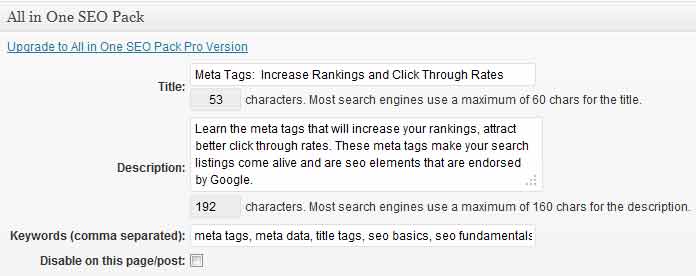
All in One Seo Pack
You can easily type in your meta tags (title, description and keywords) in a plug-in such as All in One Seo Pack for WordPress

If you want to enter in your meta data, without the plug-ins, then WordPress allows you to edit only the body of your document in the Posts section of it’s editor. In order to get to the head section of your page, to enter in your meta data, you need to access your page templates files that are stored in your server. Most themes have the head of the document tilted “header.php”. This is also true, for those of you who are using other Content Management Systems.

a. Unique and Accurate Page Titles

Html title tags:

<title></title>

Page titles are extremely important indicators (if not the most important) that inform search engine what your page is about. Here are pointers to keep in mind when creating your title tags:

  • The title tag is not to be confused with your page heading. It belongs to your meta data and is the title that users see at the very top of your web browser.
  • Your page titles must be 60 characters or less (W3 – World Wide Web Consortium also recommends less than 60 characters). Most search engines cut off titles after 60 characters.
  • Since you have a limited number of characters, your title is precious real estate. You need to be very selective. Think like a user and type in search terms that you know the user will use. Some users will only look at titles so they need to be attractive to make the user want to click through, when your result shows up in search.
  • Page titles for each page must be unique, and not repeated anywhere else on your site
  • Best seo practice is to include your keyword in your page title preferably at the beginning of your title

Page Title in SERP's
Title of current page in Firefox

b. Description meta tags

Html description tags:

<meta name="description" content="" />

Description meta tags describe what your page is about and are displayed along with your title in search results. Here are some tips to keep in mind to make the most of your descriptions. Although description meta tags are discounted by Google for rankings, other search engines still use them for ranking articles.

  • You are allowed 160 characters. Accurately describe the page, products etc in your description meta tags. Include words that users are likely to use to find the page.
  • Include your keywords. Avoid keyword-stuffing. Try to also include a CTA (call to action) such as Read more, Find out, Learn all about….
  • If you write an enticing description, it will increase your CTR (click through rate). Also, a meta description allows you to stand out from other sites that the user can click on.

Description in Google
Words in the snippet are bolded if they match the user’s query

c. Keywords

Html keywords tags:

<meta name="keywords" content="" />

Use as many synonyms, separated by commas, as you think the user may use to define this section. Even though keywords don’t affect rankings any more, search engines will show them up as snippets in search results if the user query matches the keywords.

Use Rich Snippets to Tag Your Meta Data

Google Webmaster Help have released a series of Rich Snippet videos to help you get started. Here is a quick introduction:

Snippets—the few lines of text that appear under every search result—are designed to give users a sense for what’s on the page and why it’s relevant to their query. You can help Google surface this relevant information by adding additional HTML markup to your pages. This markup helps Google recognize certain types of data and display it usefully in rich snippets.

In Google’s own words:

Rich Snippets are markup tags that webmasters can put in their sites in order to tell Google what type of content they have on their site so that we can better display it in search results.

Rich snippets are evolving in part due to a new initiative, schema.org (joint initiative of Bing, Google and Yahoo). Although this initiative is more than a year old, few websites have made the transformation. You could reap the benefits of improved visibility, since you will be at the forefront of using this structured markup.

Google supports rich snippets for these content types:

  • Reviews
  • People
  • Products
  • Businesses and organizations
  • Recipes
  • Events
  • Music

More information about rich snippets is available on Google Webmaster Tools rich snippets page.

Here are some additional resources for learning more about meta tags and their use in Seo:
Google Webmaster Tools

Google’s Seo Starter Guide

Google’s Report Card

Do you use meta tags? What has been your experience with using them? Please share in the comments below.
If you’d like the rest of this 5-part seo series to be mailed directly to your inbox, please sign up for Web Content Blog’s free updates.

You May Also Like:
Google Gets Picky Over Content with Panda
7 Essential SEO Tools for All Content Writers
High Quality Content: A Simple 4-Point Checklist

Filed Under: Seo Tagged With: description meta tags, keywords, meta data, meta tags, seo, seo basics, title tags

Promote Your Blog with these 3 Twitter Tools

July 31, 2012 by Gazalla Gaya

This post is one of a series of posts on blog marketing.

The twitter tools that we will look at today will help you to promote your blog with the simple concept of social shares. These twitter tools help connect you to other bloggers who retweet and share your content. Social signals and social sharing are great ways to market your blog for these reasons:

  • Google has started using social proof and sharing on social media as an important indicator in the ranking of articles. In fact, a study conducted recently confirmed that retweets affect rankings.
  • When other bloggers share your posts via Twitter and other social sharing sites, you gain instant access to a very wide network which allows you to increase and broaden your reach.
  • Since you reach a wider network, you will automatically increase traffic to your blog.
  • A great side benefit of using these twitter tools is that you establish a rapport and connection with other bloggers who share the same interests. The results are amazing, in terms of feedback that you receive, comments on your blog etc… You also invariably connect with them on various social media sites.
  • Since other bloggers who share your content will visit your site and read your posts you could land some tremendous guest posting opportunities.

Let’s look at 3 Twitter tools that are rapidly going mainstream and are helping small and big bloggers reach new markets everyday.

3 Twitter Tools that Increase Traffic

Triberr

Triberr allows you to increase traffic to your blog with the concept of “tribes”. Tribe members retweet and share your content within their networks which amplifies your reach. For example, if you join a tribe that has 6 members and each member has 1,000 followers, your potential reach is 6,000 people.
Once you join Triberr you can either lead your own tribe or join (be invited to join) a tribe. The tribe members will promote your posts on their networks. Your posts are fed into Triberr via your RSS feed. The RSS feeds will allow it to automatically appear on your tribe mates’ tribal Stream. Triberr allows you to enter up to 3 RSS Feeds at a time. However, each tribe can only have one blog feed assigned to it.

Triberr initally started last year as a by invitation only app. and tribe members only had the option of retweeting. Now, of-course Triberr is open to the public and you also have the option of sharing content on several other social media sites such as Facebook, Google+, StumbleUpon and Reditt.

I use Triberr and love the interaction and rapport that I’ve established with other bloggers in my niche. It’s also given me guest posting opportunities and from time to time, a tribe member will stop by and comment on my posts. It’s great to receive that kind of feedback.

There are certain guidelines that will help you get the most of Triberr:

  • Before you join a tribe, look up the twitter handles of the tribe members. Visit their sites and get a feel for the type and quality of their content. This is an important step, as you will know if you feel comfortable endorsing their content.
  • Always join a tribe that is related to your niche. That way you will not be spamming your followers by tweeting irrelevant stuff. For example: If you are a mystery writer there are several mystery writer tribes. Joining one will give you access to promote other other tribe members’ posts and they to promote yours.
  • Initially, Triberr had only an automated option for tweets. Now, all shares are in manual mode so you can tweet only relevant content. If you feel that a post is not up to quality, it goes without saying that you shouldn’t tweet it. Manual mode is great because you can now share stuff that you like and that is relevant to your followers.
  • When approving posts, do them in batches so that you don’t offend any followers by posting too many at one time. Otherwise, you run the risk of annoying your existing, organic followers. It will also look like spam.
  • Always read the posts for quality assurance, before sharing across your networks, until you are comfortable with the people in your tribe that constantly produce excellent content.
  • Allow certain days for your natural organic reactions and shares to continue. I like to use Triberr on 2-3 days of the week and on other days I like to curate content from my followers. Otherwise, it will stop you from reading your own Twitter feed. Your natural, organic interactions will disappear. Don’t forget to have your natural organic responses and tweeting other fellow tweeps’ posts.

Justretweet.com

Justretweet.com is a great way to increase traffic by reaching people who are not in your network and operates on the concept of “credits”. You earn credits for tweeting others’ content and following other people on Twitter. You can dispense these credits by offering them to others who retweet your content. You can set the minimum number of twitter followers. You also have the option to buy credits. For example, If I earned 300 credits, I could dispense 180 of them, by offering 30 credits to each blogger that retweets my post and set a total limit of 180 credits (ie. 6 retweets).

Ms. Ileane of basicblogtips and Gail Gardner of Growmpap, both famous bloggers with established blogs have recommended and used justretweet.com.

I’ve used justretweet.com in the past and have had good luck with it. The only thing again that I’ve had to watch out for is getting quality content that is relevant to my niche, to share with my network. Sometimes, I’ve had to wade through several tweets before finding something that is tweet worthy and worth sharing with my followers.

Easyretweet.com

I’ve just used easyretweet.com before writing this post and found it to be similar to justretweet.com. You earn credits by following and retweeting others’ content. You also have an option to earn credits by viewing other blogs. You dispense these credits to others for retweeting your content, following you or visiting your blog.

Since social media has eliminated costs and increased exposure, blog marketing today is cheaper and also more efficient in reaching more readers every day. Social media sites such as Twitter have opened the floodgates to both novice and professionals to use the tools they have to offer.

Do you agree with these methods of blog promotion? Please share your thoughts in the comments below. Thanks.

You May Also Like:
7 Blog Marketing Ideas that Increase Traffic and Conversions
Twitter and Time Management: Best Tools and Strategies
Blog Post Checklist: 8 Essential Tasks before You Publish

Filed Under: Blogging Tagged With: blog marketinng, blog promotion, easyretweet.com, justretweet.com, triberr, twitter tools

5 Content Mistakes that Drive Away Prospects

July 23, 2012 by Gazalla Gaya

You have only 30 precious seconds (according to many reports) to capture your prospects’ attention, to engage and pull them into your copy. If a prospect does not find the info he is looking for on your site, he will exit quickly and continue searching until he finds the info on a competitor site.

Case studies reveal that prospects are looking for simple things especially on their first visit: How useful is your product to them? How much does it cost? Are there any problems that they need to know about in advance? Having that info easily available and avoiding certain key content mistakes would mean better conversion rates and happier customers.
Here are some top content mistakes that cause prospects to leave and visit the competitor’s website. I welcome comments and would be interested in your top web content peeves as well.

#1. About Page

Certain content mistakes are easy to avoid and also serve as best practices. Too many brands use About pages to incessantly talk and brag about their story.

About pages are content goldmines. They are perfect opportunities to advertise and increase conversion rates. An about page should be used as a selling tool to convince your prospects why your product is ideal for them. Will it make them rich? Will they lose weight? How is it going to enhance their life? Ideally, About pages should:

  • Give visitors a reason (several reasons, ideally) for doing whatever it is you want them to do: contact a sales lead, join a campaign, send money, buy a widget.
  • Make a strong case for what sets you apart from other businesses like you.
  • Give visitors context for the information they find elsewhere on the site.

#2. Drawbacks of Your Product

Certain content mistakes are hotly debated and not everyone agrees on their solutions in content marketing. Most businesses avoid talking about problems on their websites, thinking that it will turn customers away.

There are several case studies that have proved the opposite, Riverside Pools being a perfect example. Marcus Sheridan, (content marketing expert from thesaleslion.com) who also owns Riverside Pools, set up a blog post underlying all the problems with fiberglass pools. This one article, Top 5 Fiberglass Pool Problems and Solutions, on his website garnered 137 comments, 168 inbound links, and 25,589 views and an incredible amount of money in sales. Since, none of his competitors talked about the problems with fiberglass pools his post always came up first in search results.

According to Marcus, ever since his mantra has been, “He who gives consumers the Good, the Bad, and the Ugly of a product will always be the content king.”

FAQ pages are invaluable in answering common customer questions. The sales and customer service team of your business are also resources who will be able to guide you on the problems customers are facing, so that you can address them in future content updates.

#3. Pricing Info

Pricing info is again on the list of content mistakes that don’t have a consensus. Some businesses will not have pricing info, thinking that they don’t want to turn off any customers. Here are the top reasons why it makes sense to always include pricing:

  • The first question on people’s mind after they are sold on your product is how much will this cost me? Can I afford it? If they can’t find that info, they will look it up elsewhere, probably on a competitor website in which case your competitor has won.
  • Putting your costs and pricing out there weeds out the customers who cannot afford your services or products. It increases conversion rates, helps to save your time and theirs as well.
  • It creates an atmosphere of transparency and trust, both essential for marketing on the web.

Some companies have a problem putting up fixed prices. Their pricing varies according to the type of service. This is also true for small business consultants. In that case, these two approaches work best:

  • It’s always fine to give a range.
  • Include a form on your website, where the prospect can put in details that you need such as scope etc. You then get back to the potential buyers with all the details over the telephone / email

#4. Only Evergreen Content

In the current global marketplace, your website is your virtual office. If you have only evergreen content on your website, it gives the impression of an abandoned website. It is the equivalent of an old store with yesterday’s products and mannequins that have dust gathering. I don’t know about you, but I would not like to buy or do business with a neglected storefront.

Nowadays, there is no one size fits all solution to content. Evergreen pages are also necessary, but you need to have a blog so customers keep returning. You need to have an email newsletter for loyal customers. You need to post content on social media sites for those customers who like to interact with you on social media. In other words you need to have constant action of some kind on your website, so prospects realize that yours is a thriving business.

#5. Not Incorporating Social Media into Your Content Marketing Mix

Research shows that customers prefer to interact with brands through social media channels and that while other forms of contact such as contact forms, emails, phones are still relevant, social media is quickly becoming the number one choice of customers especially for an answer to customer service questions and queries. It’s no surprise that having social media icons on your site greatly increases conversion rates.

The brands who are using social media to interact are doing well and in some cases have turned around people’s perception of their company. The early adopters are paying rich dividends. Mashable had an article with case studies showing the smartest brands using social media correctly.

  • Here are some examples from case studies:
    • Starbucks is a perfect example.To get a better handle on consumer feedback, Starbucks did just that with “My Starbucks Idea.”
      The site allows users to submit suggestions to be voted on by Starbucks consumers, and the most popular suggestions are highlighted and reviewed. Starbucks then took it a step further and added an “Ideas in Action” blog that gives updates to users on the status of changes suggested.
    • @comcastcares, a Twitter account setup to help Comcast users in need.
    • The dell social media initiative where Dell has set up social media command centers where they actively listen for comments on the company.

    Do you agree with these 5 mistakes? Do you have more to add? Please share in the comments below.

    You May Also Like:
    Top 3 Content Mistakes that Cost You Valuable Conversions
    7 Content Marketing Ideas that Increase Traffic and Conversions
    7 Resources that Accurately Predict the Best Content for Your Audience

  • Filed Under: Content Marketing, Web Content : Ideas, Tips and Resources

    • « Previous Page
    • 1
    • …
    • 5
    • 6
    • 7
    • 8
    • 9
    • …
    • 11
    • Next Page »

    Free Email Updates

    Receive free updates on the latest in digital marketing.

    About Content Trends

    Content Trends covers the entire spectrum of content marketing. Get tips sent to your inbox on content marketing strategy, content writing, SEO, blogging and social media. Learn more

    Copyright © 2026 · Metro Pro on Genesis Framework · WordPress · Log in
